
x-talk
Analytics

Every conversation tells you what to improve.

Phone, in-app voice and chat, web chat and messaging land in one analytics view. See how many conversations the agent handles on its own, where customers wait for a consultant, how conversations end and which problems keep coming back.

check_circle
Overview, voicebot, chatbot, handoffs, app
check_circle
A summary and outcome for every conversation
check_circle
Hotspots with ready fixes
insights
Overview
LAST 14 DAYS
Conversations 24,860 +6% vs previous period
Handled by AI only 72% +3 pp
Handed to a consultant 18% −2 pp
Avg. wait time 0:38 −11 s
DAILY CONVERSATIONS BY CHANNEL
Voice: phone and app Chat: web and app Messaging
HANDLING TIME: AI / CONSULTANTS
AI · 78%Consultants · 22%
Metrics

Numbers that tell you whether service works.

Not the number of conversations, but what came of them. Narrow every metric by channel, agent and period.

task_alt
Handled by AI only Share of conversations that needed no consultant. The key metric of a deployment.
alt_route
Handoffs to consultants How many conversations the agent passed to people, how many were answered and how many were missed.
timer
Waiting and handling time Average wait for a consultant, consultant handling time and time spent with the AI agent.
bedtime
Traffic outside working hours The share of conversations outside working hours, when nobody would have answered before.
flag
Outcome of every conversation Information given, offer presented, lead, ticket, handoff, no resolution or abandoned.
star
Conversation quality A quality score from AI analysis and key moments, such as slow agent replies.
help
Needs attention Unresolved conversations and open tickets gathered in one view.
savings
Credits and cost per conversation Usage by type: voice agent, chat, consultants, recordings and SMS, plus the cost of each conversation.
Channels and heatmaps

Know when and how customers reach you.

The heatmap shows traffic for every hour of the week, separately in the voicebot, chatbot and mobile app reports. Plan consultant shifts around real peaks, not hunches.

check
Five channels: phone, in-app voice, web chat, in-app chat and messaging
check
Busiest day and hour, and the share of traffic within working hours
check
Voicebot: inbound and outbound calls, minutes, average call length and agent response time, rejected calls
check
Chatbot: messages, average messages per conversation, abandoned chats and the pages where customers started chatting
check
Mobile app: logins, unique users, devices, calls, chats and tickets
check
Mailbot: share of drafts sent unchanged, by inbox category
Mon
Tue
Wed
Thu
Fri
Sat
Sun
0:006:0012:0018:0023:00
Busiest day Mon
Peak 9:00
In working hours 68%
Queues and consultants

See your team's load before customers start waiting.

The handoff report shows how many conversations the agent passes to people, where they go, how long the customer waits, whether anyone answered and how the handoff ended.

support_agent
Handoffs · queues
Answered 91%
Avg. wait 0:38
Waiting now 3
HOW THE HANDOFF ENDED
Consultant console 64%
Phone fallback 21%
Direct number 9%
Pending 6%
WHERE THEY WENT · HANDOFFS / SHARE
Customer service 212 handoffs 47%
Technical team 141 handoffs 31%
Complaints 98 handoffs 22%
groups
Where conversations go Which queues and channels handoffs go to, broken down by where the conversation came from.
pending
Waiting now How many conversations are waiting for a consultant right now, next to the average wait for the period.
call_end
Missed handoffs How many handoffs nobody answered, and what share of all handoffs that is.
route
How the handoff ended Consultant console, phone fallback, direct number or still pending.
person_add
Leads from conversations How many leads were created in the period and how many are still new.
hourglass_bottom
AI time vs people time How much handling time goes to the AI agent, how much to consultants and how much to conversations waiting unassigned.
lightbulb
Many handoffs on one topic usually mean missing knowledge or a missing tool, not a “weak model”. Many returns to the agent because nobody answered signal that queue hours or staffing need fixing.
call
Conversation · phone
4:12 · AI ONLY
AI SUMMARY Problem: the customer asked when order 4471 would arrive. Action: the agent checked the status and sent a confirmation text. Result: delivery on Thursday 10–2, no further action.
sell
Delivery status
sell
Order
flag
Information given
TAGS · 30 DAYS
Delivery status 3,120 +8%
Complaint 1,640 +21%
Rescheduling 1,105 −4%
Invoice & payment 860 −2%
Pricing 540 +3%
Tags and summaries

Nobody has to read transcripts to know what happened.

After every conversation, AI gives it a title, writes a summary as problem, action and result, and records how the conversation ended. Tags from your list show what customers ask about most.

summarize
AI summariesA title and summary: the problem, what the agent did and the result. Consultants and managers don't have to read the whole conversation.
sell
Automatic and manual taggingAI assigns topics from a list your company defines. Consultants can add their own tags.
trending_up
Topic trendsSee which topics are growing. A spike in complaints shows up before quality control reports it.
search
Conversation list and filtersSearch by content, phone number or contact name. Filter by channel, agent, consultant, tag, category, outcome and ticket status.
Hotspots · recurring cases

Problems that keep coming back, with a proposed fix.

X⁠-⁠TALK finds recurring problems in conversations and groups them into hotspots. Each has a type, conversation count, examples, a recommended fix and a status, and every conversation shows how many hotspots it touches. Ready fixes wait in the FAQ drafts and Prompt proposals tabs. Pick a type to see examples.

local_fire_department
Hotspots
6 hotspots
PROBLEMTYPECONVERSATIONSRECOMMENDATIONSTATUS
Returns after 14 days Unhandled 86 Add the late-return policy to the knowledge base New
Complaint status check Unhandled 64 Connect a tool: complaint status from the helpdesk In progress
Changing the delivery address Escalations 52 Let the agent change the address before dispatch New
0% instalments – terms Unclear 41 FAQ draft: who qualifies and the instalment period In progress
Reading out the order number Repetitions 37 Prompt proposal: repeat the number digit by digit and confirm Resolved
Delivery cost to islands Unclear 18 Simplify the delivery cost table on the website Resolved
01 Conversations Every channel, AI and consultants.
02 Analysis Summaries, tags, hotspots and ratings.
03 Decision Knowledge, instructions, a tool or a process?
04 Fix An FAQ draft or prompt proposal, checked by a test.
05 Measure The hotspot disappears, resolution goes up.
Cases and conversation analysis

From the big picture to a single agent reply.

confirmation_number
Cases and tickets The agent opens a ticket during the conversation from a template: complaint, service request, order or your own form.
check
Tickets by type and status: new, in progress, closed
check
Each ticket linked to its conversation, recording and transcript
check
Conversation views: needs attention, with a lead or ticket, handed off, with an open ticket
check
Sync with ManageEngine ServiceDesk Plus; tickets in Freshdesk, Zendesk, ServiceNow and HubSpot
manage_search
Single conversation analysis When an agent reply raises questions, check step by step where it came from.
check
Conversation flow and the tools that fired
check
Knowledge-base sources used in each reply
check
Key moments and the agent's average response time, such as slow replies
check
The agent Copilot reads the conversation and proposes an instruction change, checked by tests
Data beyond the panel

Analytics where you already work.

Export reports to CSV and pull conversations, tickets, leads and statistics through the API. Through the MCP server, ask your company's AI assistant about them.

ASK YOUR AI ASSISTANT · MCP “Give me the weekly review: how many handoffs, and why?” 42 handoffs, 38 answered, average wait 0:41. Most often service appointment rescheduling (14), delivery delays (11) and 0% instalments (8). On instalments the agent lacked information; it's worth adding to the knowledge base.
download
CSV export Reports, leads and tickets into a spreadsheet or data warehouse.
api
REST API and webhooks Conversations, transcripts, leads, tickets and statistics. Notifications for finished conversations, new leads and tickets.
hub
MCP server Reports (overview, voicebot, chatbot, handoffs, app), conversations, tickets, contacts, knowledge base and agents in Claude, Microsoft Copilot Studio and Azure AI Foundry.
shield_lock
Read-only by default Transcripts always masked. Changes customers would see need human confirmation and go to the event log.
info
Data on this page is sample data. Analytics scope depends on the plan.
In the X⁠-⁠TALK panel

Analytics in the real panel.

Every channel in one view: how many cases the agent closed alone, how many it handed to consultants and how long customers waited.
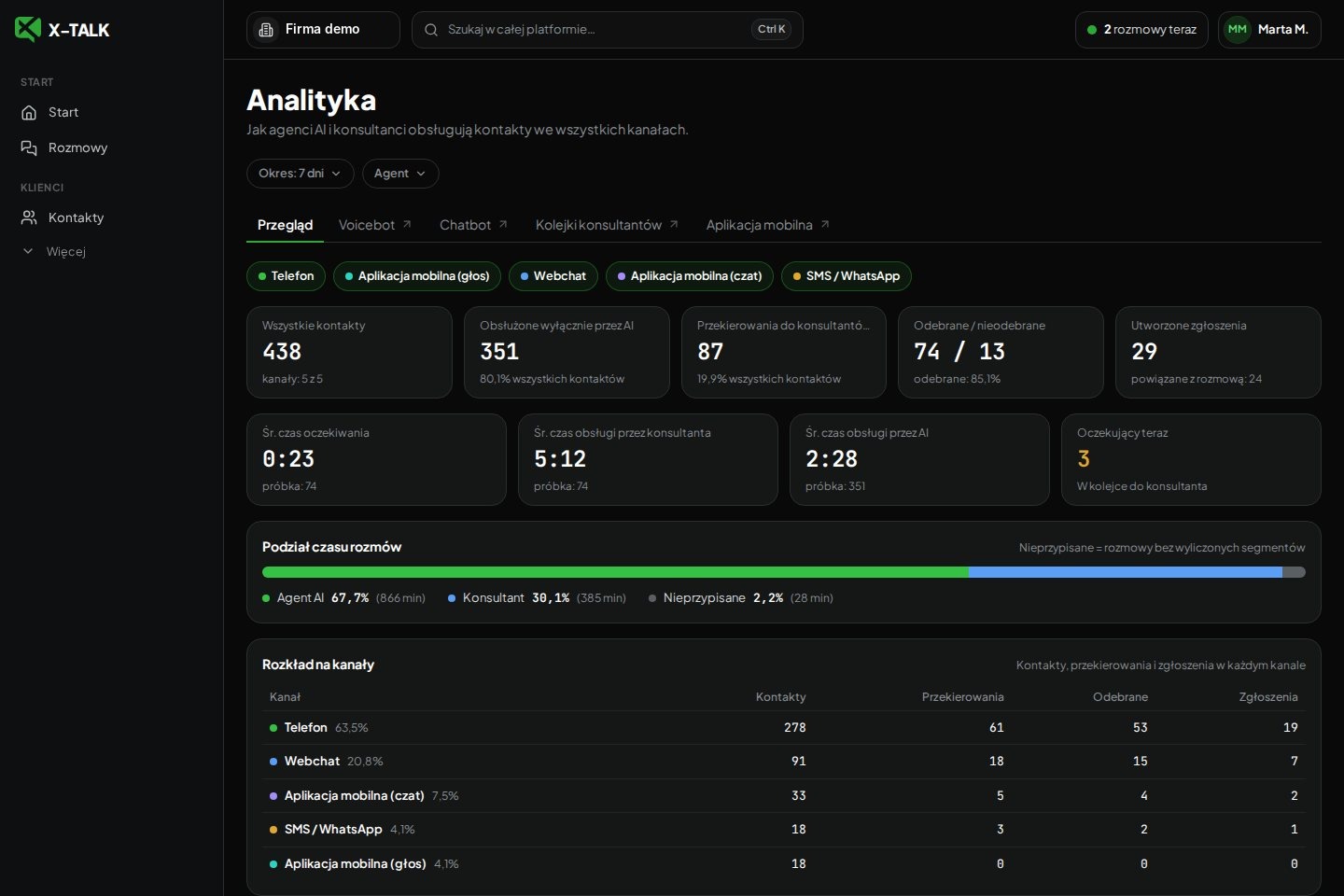

Analytics overview in the X⁠-⁠TALK panel
Analytics overview: contacts across five channels, handoffs to consultants, handling times and tickets by type. Screenshot of the live platform, demo data.

See analytics on your own conversations.

Copilot builds an agent from your website in minutes. After the first conversations, you'll see them in the reports.