
x-talk
Service desk for retail chains and multi-site companies

Staff call with a problem. They hang up with a fix.

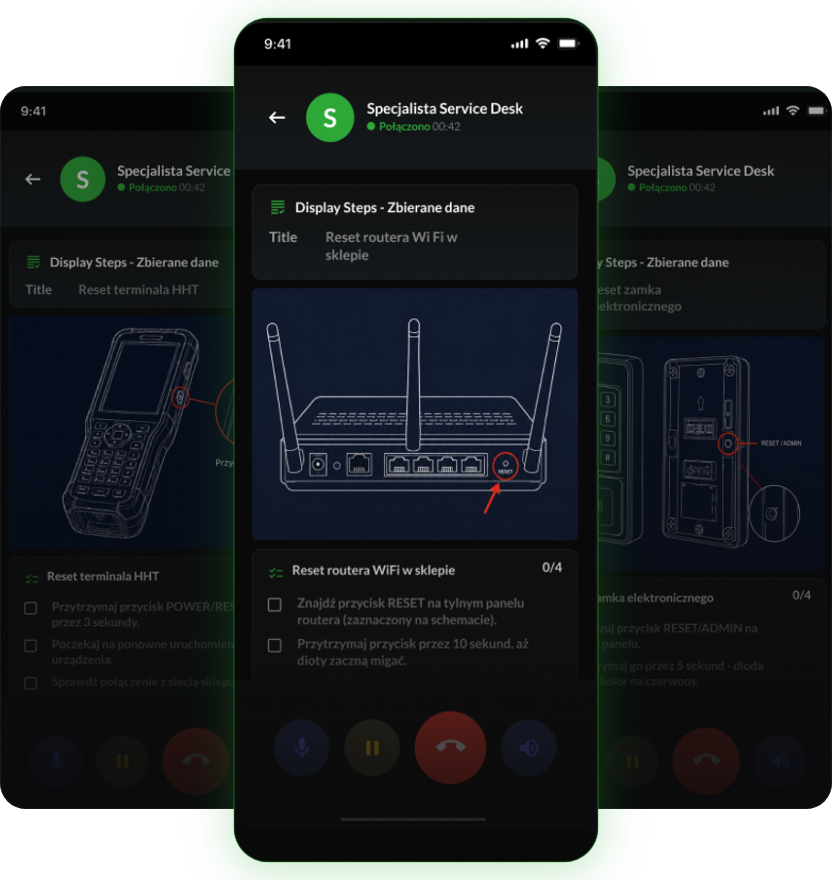
X⁠-⁠TALK recognises the issue, guides the employee step by step on their phone screen, and when a technician is needed, hands over a ticket with the full context.

check_circle
Fewer escalations to technicians
check_circle
The procedure followed the same way every time
check_circle
Works in a noisy store
Visual instructions during a call
task_alt
Step by step on screen, during the call
Scale

One fault takes a few minutes. Across your network it's hours every day.

point_of_sale
Payment terminal not working ~8 min
router
Router not responding ~5 min
lock
Electronic lock jammed ~6 min
What first line takes today 450 h of first-line calls per month That's roughly 2.8 full-time roles answering similar questions every day.
A simulation on your assumptions. How much the agent can take over, we'll check on your real tickets.
How it works

It fixes on the spot whatever doesn't need a technician.

„Hi, the store router isn't connecting to the internet.”
01
Recognises the issue
Staff speak in their own words. No menus, no “press 1”.
02
Picks the procedure
From your knowledge base, for this device and this location.
03
Guides on screen
Device diagram, highlighted button and steps ticked off one by one.
04
Escalates with a summary
If a technician is needed, they get a ready ticket, not a puzzle.
S
Service Desk Specialist
Connected 00:43
Procedure
Reset the store Wi-Fi router
device diagram
Steps0/4
check_box_outline_blank
Find the RESET button on the back
check_box_outline_blank
Hold it for 10 seconds
check_box_outline_blank
Wait for the lights to blink
check_box_outline_blank
Check the connection at the till
mic
call_end
volume_up
ZGL-2026-0204 In progress
LocationStore 214, Poznań
Reported byShift manager
DevicePayment terminal, till 2
SourcePhone · AI agent
Steps done2 of 3 · screen photo
bolt
AI summary
The terminal at till 2 shows no image. A restart didn't help, error photo attached. A technician visit or device replacement is needed.
Context from the first second

It knows who's calling and from where, before the first question.

verified_user
Employee authorisation
Confirms an authorised person is calling: staff, manager or franchisee.
home_pin
Location identification
Store number, location and equipment. Nobody asks “which store is this?”.
checklist
Procedure matched to the location
The ticket has the right context from the start, so the fix comes faster.
Case continuity

The next contact doesn't start from scratch.

Completed steps, collected details and photos stay in the thread. Anyone who comes back to the case gets straight to the point.

10:14
call
Report Shift manager The terminal at till 2 isn't working. The agent opens a ticket and sends steps to the phone.
14:40
photo_camera
Update Same person Sends a photo of the error to the same ticket, not a new one.
18:05
switch_account
Shift change Next manager Continues the same ticket. The steps and photo are already there.
Next day
task_alt
Closed Store 214 The fix and status go back to the store with the full history.

Real-world conditions

In a quiet office every bot sounds great. In a store, what matters is whether it hears your staff.

Our own noise protection measures background sound in real time and only lets through speech aimed at the microphone. The agent ignores music, tills and nearby conversations.

What the microphone hears
background musictill scannercustomer chatteremployee speaking
What reaches the agent

Let's calculate how many first-line hours you can win back.

We'll take your most common tickets and show which ones the agent fixes on the spot and which it hands to a technician with a ready description.

Microsoft Azure Dedicated variant on Microsoft Azure

For networks with security requirements, we'll agree an environment with AI processing in the EEA, data masking and access rules that fit your organisation.

AI in the EEA Data masking Change log
groups
Employee service desk in Microsoft Teams too →