
“Just a moment, I’m checking”. Where an AI agent answers faster and better than a human
The most common complaint about voicebots is that they “take too long to think”. It’s true that an AI agent rarely answers in half a second. But before it speaks, it can do what takes a human agent three tabs and half a minute – search several systems, filter the results and prepare a suggestion, even when nothing is an exact match. I talked about this at Mobile Trends, and here I set it out in more detail.

In short
- A human agent says “just a moment” sooner. An AI agent gives a concrete answer sooner. For questions that require checking several things in your systems, the agent usually finishes in a few seconds; a person takes several tens of seconds.
- The agent talks and searches at the same time. A short bridging phrase (“OK, I’m checking the available slots…”) fills the time while queries to your systems run in the background.
- One sentence from a customer often means several queries. The API accepts three fields; the customer gives seven conditions. The agent breaks the request into a series of calls and handles the rest of the logic (times, exclusions, ranking) itself.
- No exact match doesn’t end the conversation. The agent relaxes the conditions and suggests the closest sensible options: another day, another city, a similar product within budget.
- Your systems also determine how fast the answer comes. The model can be the fastest in the world, but if the API takes five seconds to respond, the customer waits five seconds.
- It’s worth designing APIs for AI around negotiation, not search: ranges instead of single values, optional conditions, “closest match” instead of “exactly this”.
Why is “the AI agent takes too long to think” only half the story?
Because we’re measuring the wrong thing. We look at how quickly the first word comes, when we should be looking at how quickly the answer the customer can act on comes.
Take the sentence I opened my talk at Mobile Trends with:
“I’d like to book an appointment with an allergist in Toruń, ideally next week after four, but not on Thursday.”
A human agent will reply straight away: “Just a moment, I’m checking.” Then they open the doctors’ schedule, switch between days, check the times, skip Thursday and come back to the customer. Realistically, that’s several tens of seconds in which the caller hears clicking or silence.
The AI agent will speak after two or three seconds: “OK, I’ll try to find a slot after four.” By then, the queries to the system are already running. A few seconds after the customer finishes speaking, it comes back with something concrete: “On Tuesday I have 16:00, 16:15 or 16:30. Which suits you?”
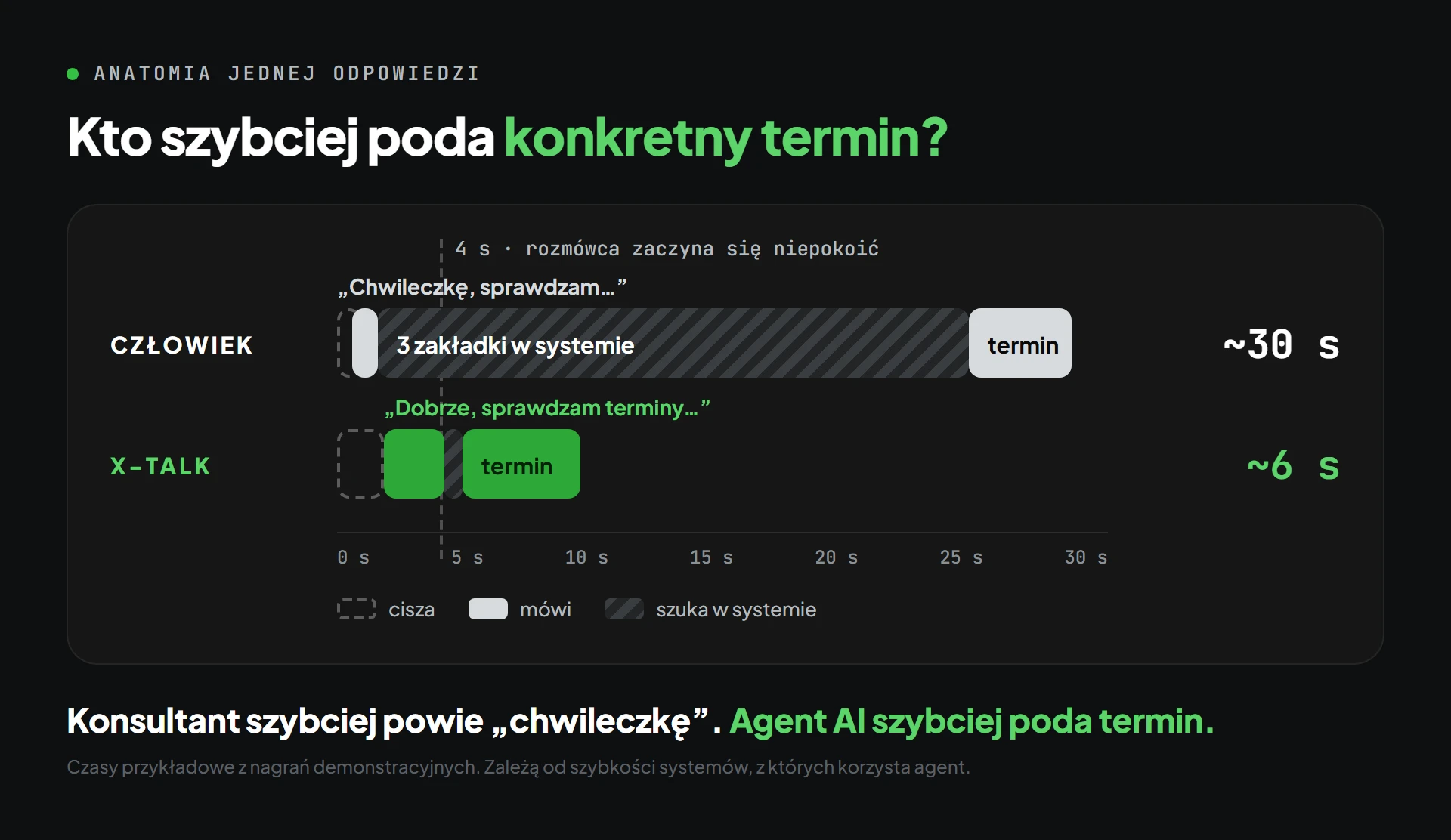
| Human agent | AI agent | |
|---|---|---|
| First reaction | straight away: “Just a moment, I’m checking…” | after 2–3 s: “OK, I’m checking the available slots…” |
| What happens next | three tabs, browsing days by hand | several queries to the system, filtering in the background |
| Concrete suggestion | after about 30 s | after about 6 s |
| When nothing fits | “Sorry, there’s nothing” or another round of searching | the closest alternatives straight away |
Example times, from demo recordings shown during the talk. They depend on how quickly the systems the agent uses respond.
What does the AI agent do in those few seconds?
Between the end of the customer’s sentence and the answer, several things happen at once rather than one after another:
- It listens and understands. It recognises that the customer has finished speaking (which is far from simple – more on that below) and extracts the conditions from what was said: specialism, city, date range, times, excluded day.
- It reacts. It says a short bridging phrase so the caller knows they’re being heard. In X-TALK, the agent does this only before tools that genuinely need a moment. It runs simple checks without announcing them.
- It builds the queries. It turns the customer’s sentence into API calls – often several, because the interface doesn’t accept all the conditions at once.
- It queries the systems. Schedule, catalogue, ticketing system. Here the time depends on your API. In the demo from the talk, the schedule query took 128 ms.
- It filters and sorts. It discards slots before four and on Thursday, sorts the rest and picks the best two or three.
- It makes a suggestion. It answers with something concrete and offers a choice straight away.
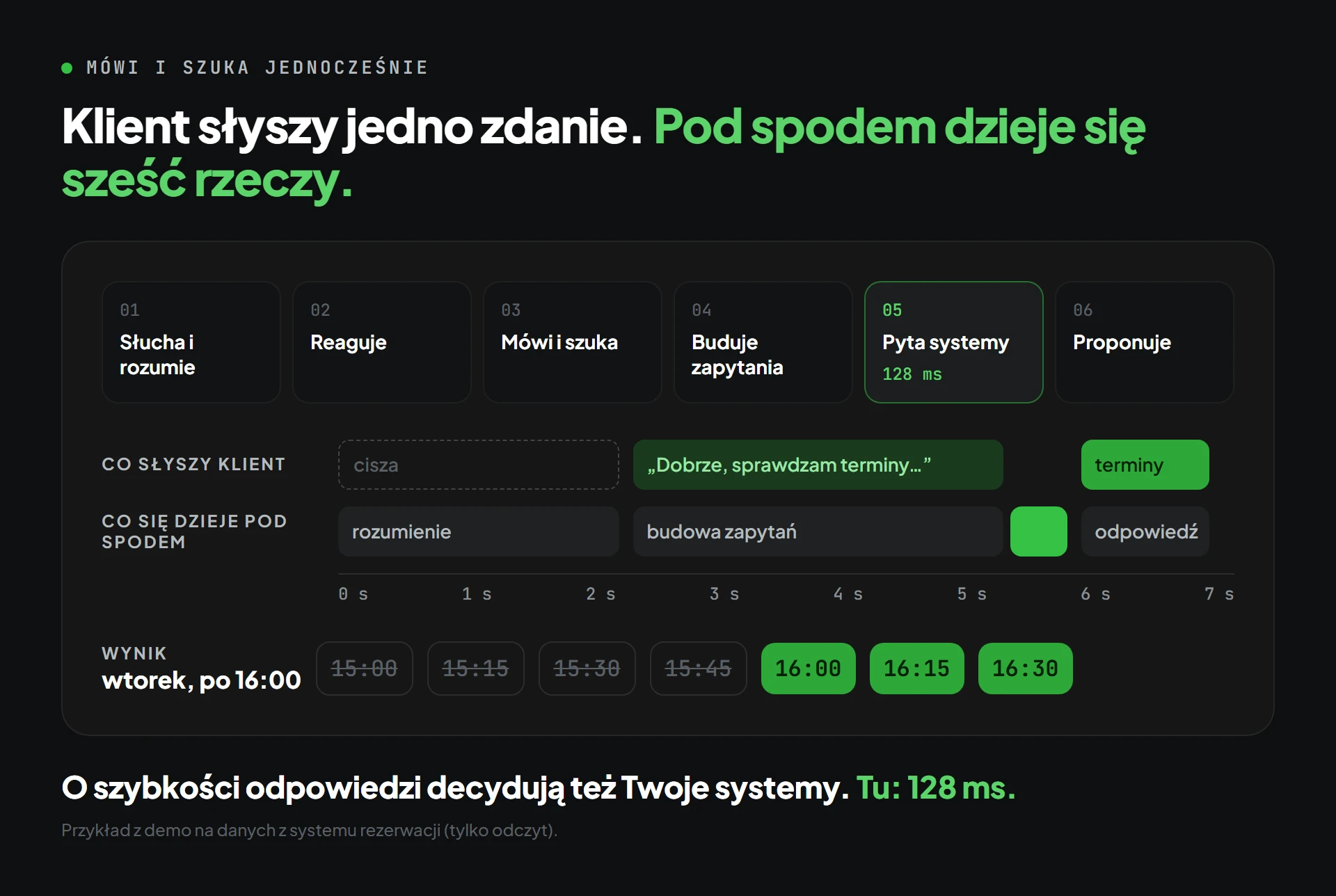
Steps 2 and 3 are key: the agent talks and searches at the same time. The customer isn’t listening to silence, and the answer is ready before the bridging phrase ends or just after it.
How much time does the agent have to answer?
Less than you might think. After roughly a second of silence, callers start to get uneasy; after a few seconds, they ask “hello?” or repeat the question. That’s why, in a voice conversation, you don’t just optimise the model – you optimise the order of operations and the number of round trips: what the agent can say straight away, what it can check in parallel and what it genuinely has to wait for.
Why does one sentence from a customer mean several API queries?
Because people speak in conditions, while systems accept fields.
The allergist sentence contains six or seven conditions: city (and perhaps the surrounding area), specialism, “next week” counted from today, times after four, Thursday excluded, and sometimes NFZ (Poland’s public health fund) or private. A typical scheduling API accepts three fields: city, specialism and one day. All required, with no time ranges.
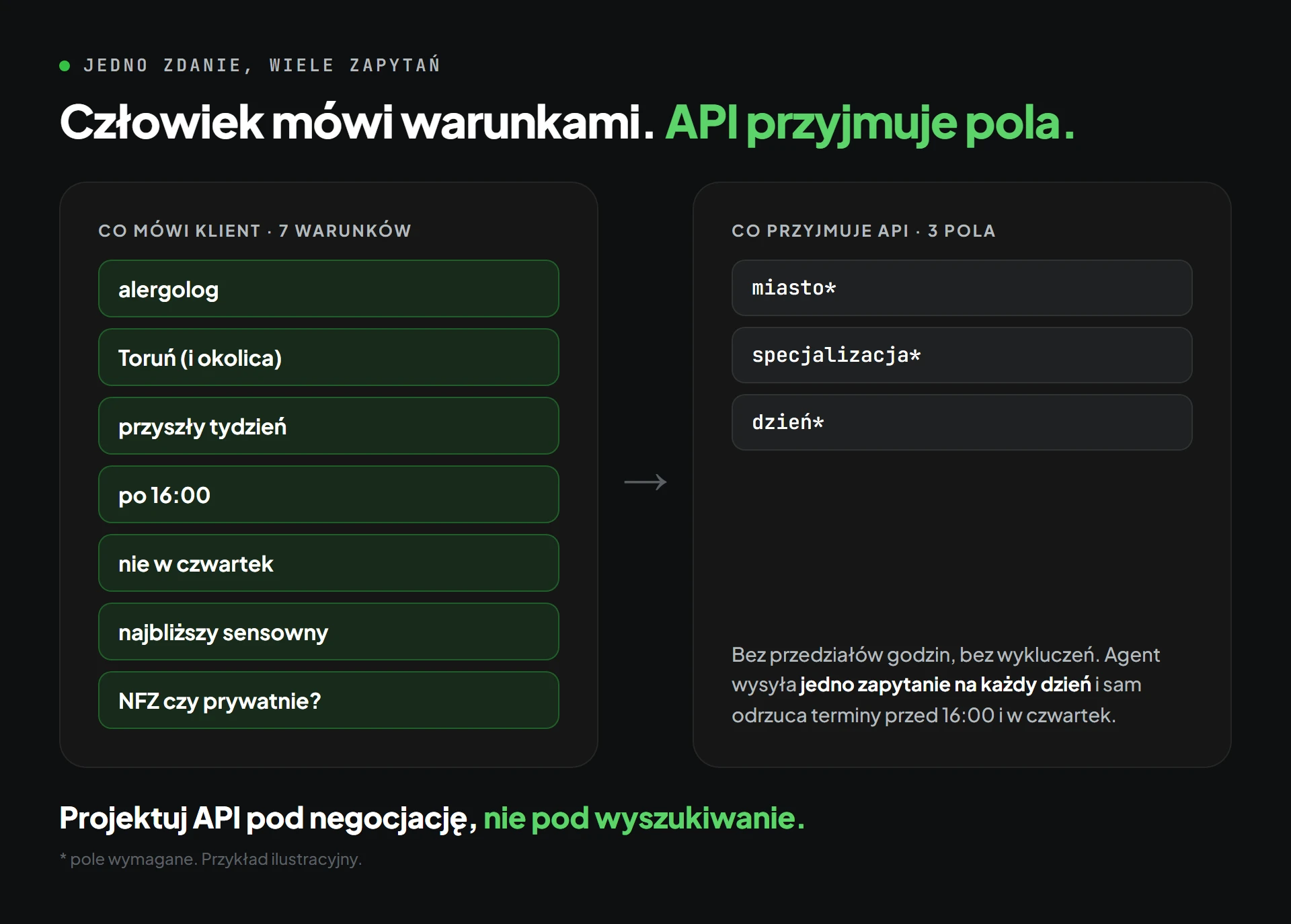
So here’s what the agent does:
- it sends one query for each day in the range (skipping Thursday),
- it retrieves all the slots,
- it itself discards those before four, sorts the rest from earliest to latest and picks the best.
We naively imagine a single call. In practice there may be five, seven or ten, plus filtering on the data collected. A human agent does exactly the same, only by hand, across several tabs. The AI agent does it in the time it takes to say “OK, I’m checking”.
What if nothing is an exact match?
This is where the agent most clearly beats a search form – and often a person too.
A search form returns “no results”. A tired human agent says “sorry, there’s nothing” and waits for the customer’s next suggestion. The AI agent already has everything it retrieved in memory, so it suggests the closest sensible option straight away:
- Appointments: “There are no free slots after four next week. The closest are Monday at 15:45 or Tuesday the following week at 16:15. I can also check Bydgoszcz – there’s a 17:00 slot there tomorrow.”
- Products: when no product meets all the criteria, search in X-TALK doesn’t end with an empty list. The agent first drops the filters the customer mentioned in passing, keeping the key ones (e.g. brand and model), and only then the budget, and shows the closest offers, explaining how they differ.
- Bookings and packages: when an instructor is busy, the agent suggests another instructor at the same time or the same one at another time. When the customer asks about several sessions, it compares a package with individual lessons.
Crucially, the agent says plainly that this is an alternative rather than pretending it found exactly what was asked for. The customer keeps the decision, but doesn’t have to come up with the next question.
Where is this advantage most visible?
Wherever the answer requires combining several conditions and several sources:
- booking appointments: medical visits, servicing, test drives, ski school lessons,
- choosing a product: budget, specifications, availability, comparing two or three models,
- status and history: an order, a ticket, a previous conversation about the same matter,
- travel and timetables: connections, delays, the next departures.
Where a single sentence from the terms and conditions is enough, the speed advantage is smaller. There, availability wins instead: the agent answers at any hour and there’s never a queue.
What determines how quickly the agent answers?
Three things, only one of which is the model:
- Detecting the end of an utterance. The agent has to know that the customer has finished speaking, not just paused after “allergist”. In a quiet office, a simple volume threshold is enough. In a shop with a cold store and tills, the threshold has to be calculated against the background in real time, and “meaning-based” detection has to be tuned so the agent doesn’t jump into natural pauses. We know this from recordings of production calls, not from the lab.
- Your systems. If the scheduling API responds in 128 ms, the answer comes quickly. If it takes five seconds, the customer waits five seconds, whatever the model. The speed of a voice conversation is also designed in your data.
- The number of steps. Every extra query eats milliseconds from the budget. That’s why it’s worth giving the agent tools that return exactly what it needs straight away, rather than raw data to crunch.
How do you design an API that an AI agent can use well?
Around negotiation, not search. People rarely ask for an exact value. They ask about a range and hope for a suggestion.
- Ranges instead of single values:
od–do(from–to) for dates and times instead of a single day. - Optional rather than required conditions: city without specialism, specialism without city.
- “Closest match” instead of “exactly this”: a single
available_fromfield instead of looping through days takes half the work – and half the time budget – off the agent. - Short, structured responses: only the fields needed for the conversation, already sorted.
If your system can’t do this, that’s fine. The agent will do it itself, with several queries. In X-TALK, Copilot will build a tool like this from your API documentation, together with tests that check whether the agent picks the right slots. Find out more in the articles on custom tools and automated agent testing.
And when the agent can’t find an answer?
It hands the conversation to a human – but with its state, not from scratch. The human agent doesn’t start with “how can I help?”, but with “I can see you’re looking for an allergist in Toruń, next week after four”. There’s one transcript for the whole conversation, and every handover is recorded in the statistics.
This matters for one more reason: the handover queue is your automation backlog. It shows what the agent can’t do yet, sorted by frequency. Find out more in the article when AI should hand the conversation to a human and on the consultant console page.
Frequently asked questions
Does an AI agent always answer faster than a human?
No. A human agent will usually say the first word sooner. The AI agent wins when the answer requires checking several things in your systems: a slot, availability, a status, a comparison. Then it usually gives a concrete suggestion within a few seconds, while a person takes several tens of seconds.
What does the agent say while it’s searching?
A short, natural bridging phrase, e.g. “OK, I’m checking slots after four”. In X-TALK, the agent only announces tools that need a moment, and it doesn’t keep repeating the same phrase. It runs quick checks without comment.
Can the agent suggest something the customer didn’t ask for?
It can suggest the closest alternative when nothing is an exact match: another day, another city, a similar product within budget. It always says plainly that this is an alternative and leaves the choice to the customer.
What if our API is slow?
Then it’s your API that sets the response time. The agent can hide part of the delay with a bridging phrase, but not all of it. What usually helps is a tool that fetches data in bulk or from a cache rather than through many individual queries. We’ll show you this on your own API in a PoC.
Does this only work in voice conversations?
No. The same logic (breaking a request into queries, filtering, alternatives) works in chat, on WhatsApp, in Teams and in a mobile app. In voice, the time difference is most noticeable, because every second of silence counts.
Where can I see it in action?
Call the X-TALK agent on +48 732 106 896 or book a PoC on your own data: we’ll show you the conversation from the customer’s question to a concrete suggestion, with timings for every step.