
x-talk
COPILOT X⁠-⁠TALK

Describe your business. Copilot builds your agent.

Enter your website. Copilot reads your offer, asks a few questions and shows the agent on top of your own site. Chat with it or call it before you create an account.

language
No sign-up, no card. Create an account only when you like your agent.
Copilot auto-komis24.pl
We sell used cars. Customers call after 6 PM and nobody answers.
Reading auto-komis24.pl
Agent profile
Name
Tone
Knowledge
After-hours goal
Handoff
Channels
https://auto-komis24.pl
Your agent will appear here
Video

See Copilot at work. From a website address to a ready agent.

A short video from the real X⁠-⁠TALK panel: Copilot reads the company website, asks a few questions and assembles an agent you can talk to straight away.

check_circle
Agent knowledge built from the website and price list
check_circle
Questions about the agent's goal instead of a long form
check_circle
The agent plan as you go: goal, knowledge, customer and tone
What Copilot does for you

Skip the workshops and documents. See your agent straight away.

travel_explore
01
Reads your website Offer, prices, hours, locations and contact. You don't retype anything.
quiz
02
Asks what your site doesn't say What to do after hours, when to hand over to a person, and to whom.
tune
03
Sets up the agent Tone, goal, scenario and handoff rules. Built on your content, not a template.
call
04
Shows it in action A widget on your own site and a “Call” button. Hear the agent before connecting anything.
Copilot across X⁠-⁠TALK

One Copilot from the first idea to an agent that keeps working for years.

Copilot doesn't stop once the agent is built. It's everywhere in the panel where you set, fix or check something. You say what should change and it prepares the change for you to approve.

auto_awesome
Start · no account
Builds an agent from your website Reads your offer, asks about what's not on the site and shows the agent right away on chat and phone. Build an agent →
edit_note
Agent → Copilot
Improves the agent in plain language Instructions, greeting, tone, knowledge, ticket types, handover to consultants, catalog and sales rules. Changes wait in a draft. How it works →
forum
Call log
Learns from real conversations Point to a conversation that went wrong. Copilot reads the transcript, tool calls and retrieved knowledge and proposes a fix. Analytics & conversations →
fact_check
Q&A tests
Writes tests and fixes failures Proposes test scenarios, also from a real conversation. After a run it tells an agent error from a test error and re-checks the fix. Automated tests →
build
Tools
Builds tools from API docs Describe what the agent should do in your system. Copilot reads the docs, builds the tool, writes tests and waits for publishing. Custom tools →
hub
Integrations
Advises when you connect systems After connecting a CRM, shop or service desk it reviews a data sample and proposes scenarios and tools for the agent. Integrations →
phone_forwarded
Agent → Copilot
Sets up outbound calls Switches calling on, picks a company number, hours and retries, writes the rules for calls the agent makes. Outbound calls →
support_agent
Whole panel
X⁠-⁠TALK Assistant answers about your data How many conversations, what customers report, which agent needs attention. Changes come as a card you approve. Analytics →
terminal
MCP & API
Works from your own AI assistant Connect Claude, ChatGPT or Copilot in your IDE over MCP and manage agents, conversations and calls from one window. Integrations →

verified_user
Copilot never publishes on its own. Every change waits in a draft or on a card until you approve it, with a before/after preview and a history entry you can roll back with one click.

Instead of waiting for a first version, you talk to it right away.

Usually
schedule
Workshops and requirement documents
schedule
A Q&A document to prepare
schedule
A first version after several weeks
schedule
A buying decision before seeing results
With X⁠-⁠TALK Copilot
check_circle
Describe your business in one sentence and enter your site
check_circle
Knowledge built from content you already have
check_circle
An agent ready to talk right away, on chat and phone
check_circle
Decide once you've heard it talk to your customers
Copilot also builds tools and cards

Your system and your answers, without waiting for a developer.

Describe what the agent should do in your system or how an answer should look. Copilot builds a tool from your API docs, with tests, and designs a card customers understand at a glance.

Copilot
Connect our orders API. Docs: api.lato-furniture.com/docs. The agent should check status by order number.
Reading the API documentation
build
order_status DRAFT
Your tool will appear here

Before you start

No. You can build and test the agent without signing up or a card. Create an account only when you want to keep and launch it.

In the X⁠-⁠TALK panel

This is what working with Copilot really looks like.

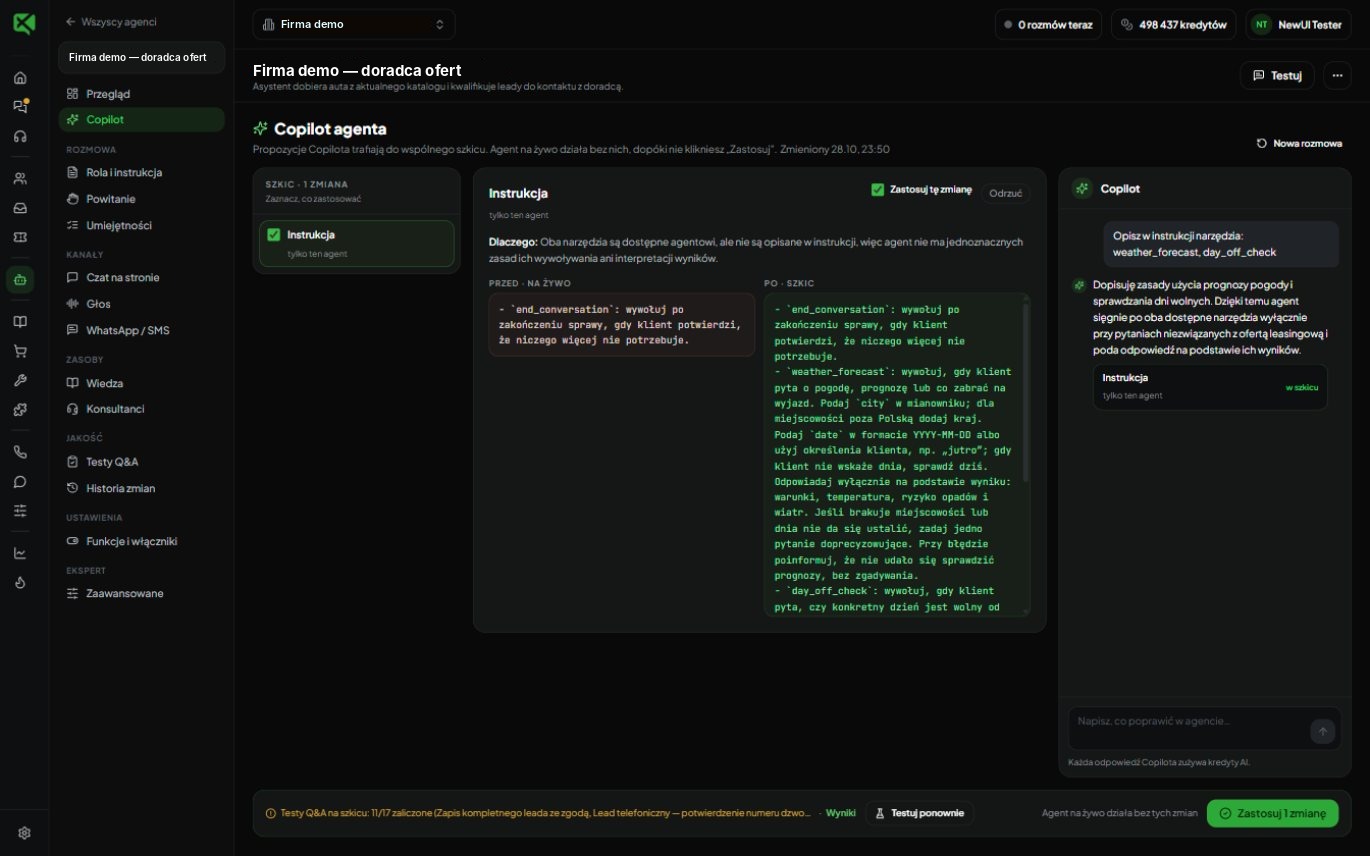
Not a mock-up. Copilot proposes changes in the agent draft, and the live agent runs without them until you approve.
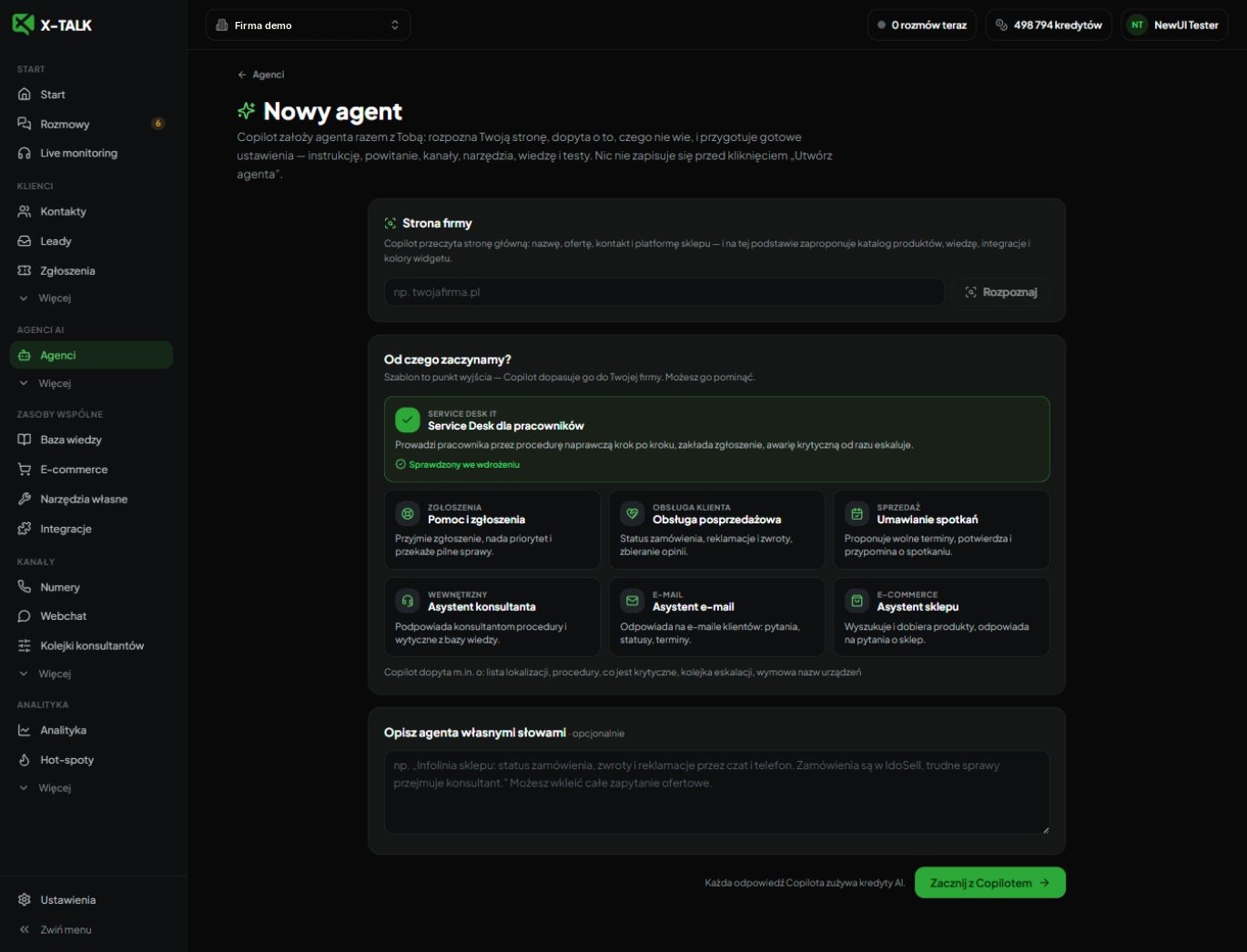
New agent screen in the X⁠-⁠TALK panel
New agent: your website, a ready template and a description in your own words. Copilot asks about the rest. Screenshot of the live platform, demo data.
Agent Copilot: proposed instruction change
Copilot edits the instruction in the draft and shows before and after. Q&A tests check the draft before it goes live. Screenshot of the live platform, demo data.

Your agent is waiting for your website address.