Multilingual service desk: the customer speaks Croatian, the team reads the ticket in English
Live call translation solves only half of the multilingual service desk problem. After the conversation there is a ticket, a summary, a handover card for the human agent and notifications to the customer. If these are written in the customer's language, or in a mix of languages, your team still cannot work with them. We show how X-TALK runs the whole case in two languages: the team works in its own, the customer gets answers in theirs, and the original is always at hand.

In short
- The whole case is translated, not just the conversation. The ticket, the conversation summary, its title and the handover card in the console are written in the team's language, even when the customer spoke Croatian, Slovak or Romanian.
- One rule sets the recipient language. If the conversation went to a queue with live translation, that queue's language decides. Otherwise the agent's main language decides. The same rule applies to voice, chat, the website widget and the mobile app.
- The original always stays alongside. An
HR → ENbadge shows that the content is translated, and a "Show original" toggle displays the customer's exact words. - Numbers, codes and addresses are not translated. An order number, store code, e-mail address or name goes into the ticket exactly as the customer gave it.
- The customer gets answers in their own language. The ticket confirmation, status changes and new messages reach them in Croatian, in the app, by text message or by e-mail.
Why is translating the conversation alone not enough?
We describe how the agent talks in more than 30 languages and how live translation works after a handover to a human agent in Multilingual voicebot and live call translation. But a conversation lasts a few minutes, while a service desk case lives longer: days, sometimes weeks.
After the conversation, people work with what it left behind:
- the ticket goes to the second-line team or to a technician,
- the summary is read by the shift lead checking why something is taking so long,
- the handover card is the first thing a human agent sees when they pick up the conversation,
- notifications keep the customer informed, so they do not call to ask "what about my ticket?".
If the agent talks to the customer in Croatian and writes the ticket in whatever language comes naturally, the description ends up in Croatian or in a mix of languages. The technician has to paste the text into a translator, and reports from the ticketing system mix languages. The other direction has the same problem: a status notification written in English means little to a store manager in Zagreb. A multilingual service desk needs every part of the case translated, in the right direction.
What does it look like in a single example?
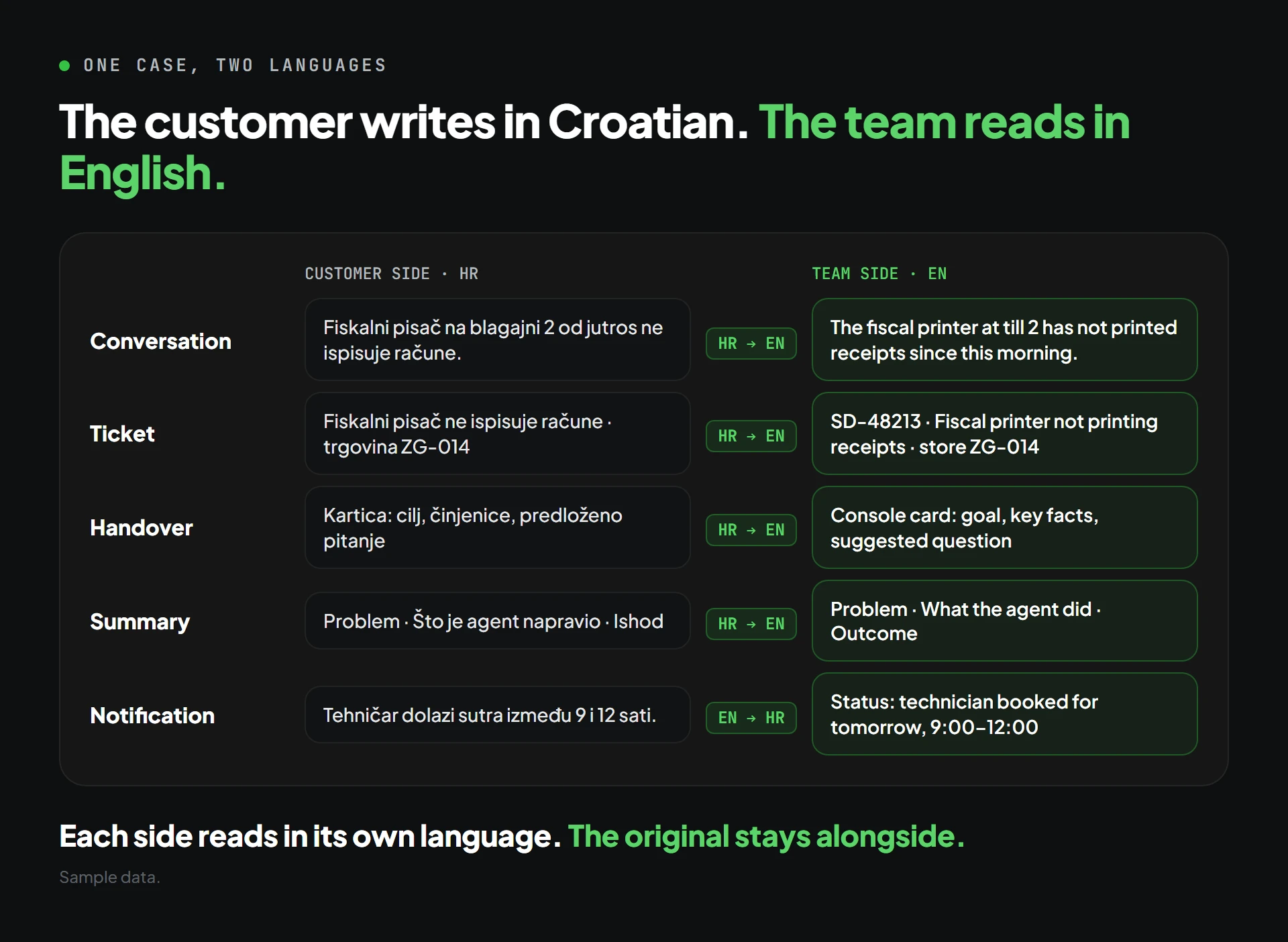
A retail chain has stores in Poland, Croatia, Slovakia and Romania, and a central service desk that works in English. A store manager in Zagreb opens the mobile app and says in Croatian that the fiscal printer at till 2 has not printed receipts since this morning.
- The agent talks to her in Croatian. It identifies the store, walks her through restarting the printer and the till, and when that does not help, it logs a ticket.
- The ticket reaches the team in English. The title reads "Fiscal printer not printing receipts", the description and form fields are in English, and the store code
ZG-014and the e-mail address stay unchanged. - The case needs a person, so the agent hands the conversation over. The human agent gets a handover card in English: the customer's goal, the facts established so far and a suggested first question. The conversation is still translated live in both directions.
- After the conversation, a summary is written in English. It has three parts: the problem, what the agent did and the outcome.
- The store manager gets notifications in Croatian. First the ticket confirmation, then a message that a technician will come tomorrow between 9:00 and 12:00.
Throughout the case, both sides work in their own language, and the original of every element is stored next to the translation.
Which language are the ticket and summary written in?
In the recipient language, meaning the language of the person or team who will work with them. X-TALK sets it with one rule that applies to the summary, the conversation title, the ticket and the handover card:
| Situation | Recipient language |
|---|---|
| The conversation went to a queue with live translation | the agents' language set for that queue |
| The conversation was on an interpreter line | the employee language set for that number |
| A multilingual agent, no handover | the agent's main language |
| A single-language agent | the agent's language |
So there is nothing extra to configure for tickets. If the "Complaints DE" queue is staffed by people who work in English, tickets from that queue are written in English. If the conversation ended with the AI agent, without a handover, everything is in the agent's main language.
X-TALK also stores the customer's detected language with the conversation. The ticket list in the dashboard shows it as an HR, SK or RO label, so a team lead can see at a glance which country a case came from and how many such cases are in the queue.
What is translated and what stays unchanged?
Descriptive content is translated: everything a person has to read and understand. Identifiers stay in the original, because a translated order number or a "corrected" e-mail address is a mistake, not help.
| Element | The team sees | The customer gets | Original |
|---|---|---|---|
| Ticket description and text form fields | in the team's language | a confirmation in their language | stored with the ticket |
| Order number, store code, e-mail, phone, name, address | unchanged | unchanged | the same |
| Conversation title and summary | in the team's language | not applicable | stored with the conversation |
| Handover card in the console | in the human agent's language | not applicable | available on the card |
| Ticket notifications | the status in their language | in their language | not applicable |
| Conversation transcript | translation in one click | not applicable | always visible |
How does the team check what the customer actually said?
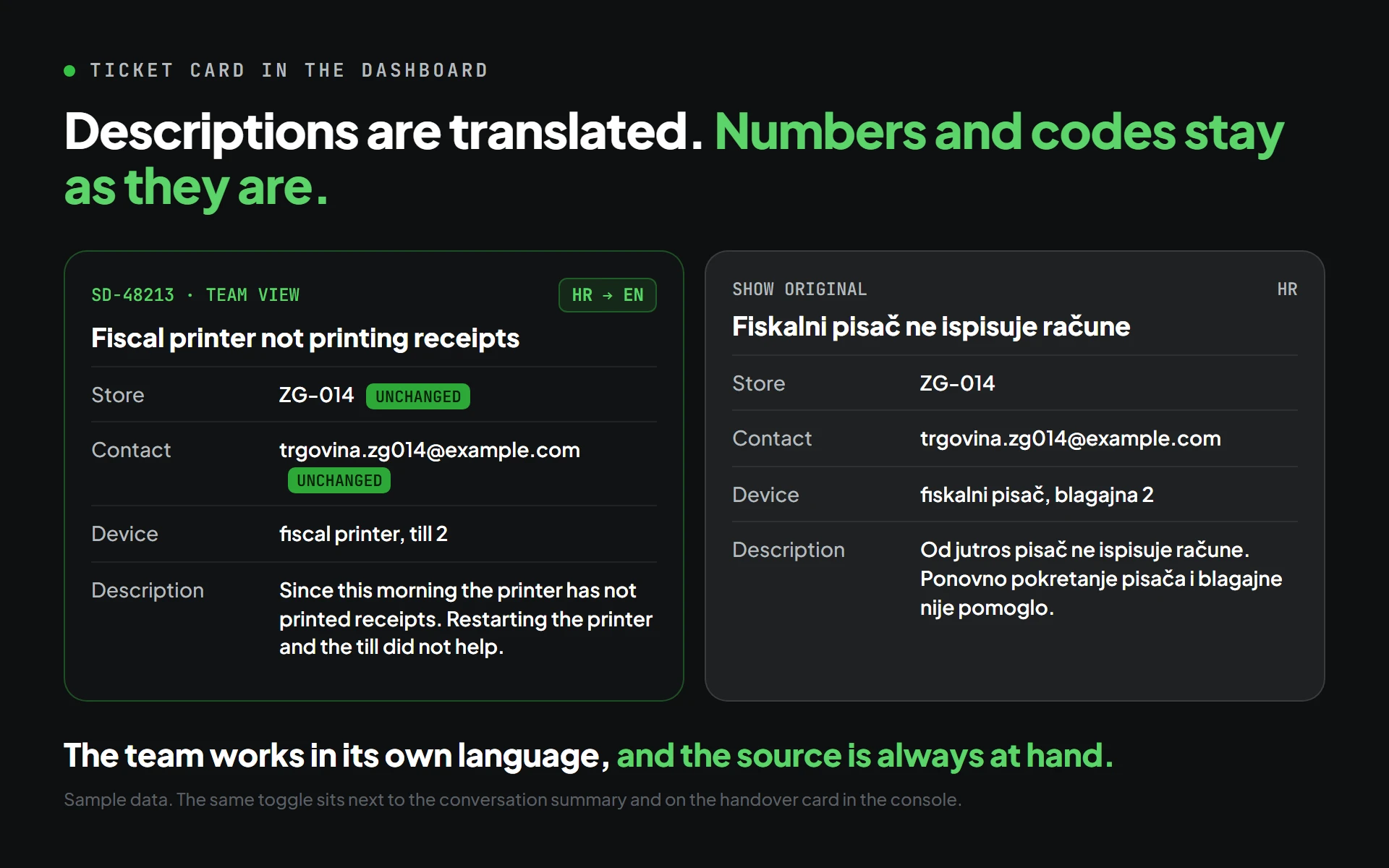
Every translated element has a badge with the translation direction, for example HR → EN, and a "Show original" toggle. One click replaces the translation with the exact text in the customer's language. The same toggle is everywhere the team works on a case:
- in the dashboard: in the conversation details (title and summary), on the ticket card next to the conversation and in the ticket preview, including form fields,
- in the agent console: on the handover card, in the conversation area and in the completed conversation view, for both calls and chats.
The original is useful more often than you might expect. In a complaint, the customer's exact wording matters. Local product names, streets or documents are sometimes translated too literally. A human agent who knows a little of the customer's language can also check that nothing got lost. The original summary follows the same access rules as the summary itself: users with a role below administrator see personal data in it masked.
What does a human agent see when they pick up a handed-over conversation?
A handover card in their own language. Before the transfer, the AI agent describes the case: the topic, the customer's goal, the key facts and a suggested first question. All these fields are translated into the human agent's language before the card appears in the console, for voice and for chat.
This matters because the human agent has a few seconds to understand the case before they say their first sentence. A card in Croatian would force them to wait for the conversation translation or to ask the customer to repeat everything. A card in English lets them start with something concrete: "I can see the printer at till 2 is not printing even after a restart. Is there a message on the printer's display?". The customer hears that question in Croatian thanks to live translation.
Translating the card has a time limit. If in an exceptional case it takes too long, the human agent gets the card in the AI agent's version, so they do not have to wait to pick up the conversation.
How does it work in the mobile app?
For many retail chains, the mobile app is the main channel between stores and the service desk, so it has to work in the user's language from start to finish:
- An interface in the user's language. The app comes in Polish, English, Ukrainian, Spanish and German, and the conversation with the agent works in every language the agent supports.
- Voice or chat. The store manager speaks or writes in Croatian, sends a photo of the printer, and can pause the conversation when a queue forms at the till, then come back to it without explaining everything again.
- A ticket list with statuses. Users see their tickets and their current status, so they do not need to call to find out.
- Notifications in the customer's language. Pushes about a logged ticket, a status change and a new message from the team arrive in the language the customer used. The same goes for text messages and e-mails.
- Handover with translation. When the case needs a person, a conversation in the app goes to a human agent the same way a phone call does: with live translation and a handover card in the agent's language.
The same logic works on the phone line, in the voice widget on the website and in chat. The channel does not change which language the ticket is written in.
What goes into the ticketing system?
The version in the team's language. If tickets go from X-TALK to an external system, for example to ManageEngine ServiceDesk Plus via a webhook or to the team by e-mail, they carry the translated description and fields. Reports, search and automation rules in the ticketing system therefore work on one language, not a mix.
The original stays in X-TALK, with the ticket and the conversation, along with the transcript and the recording. The ticket confirmation sent to the customer contains their own description, in their language, so the customer sees exactly what they reported.
Why does the server translate the ticket, not the agent during the conversation?
The simplest idea would be to add "write tickets in English" to the agent's instructions. In practice that fails. A model that has been speaking Croatian for several minutes does not always follow such an instruction: one ticket comes out in English, another in Croatian, a third half and half. With a few hundred tickets a day, that means dozens of cases someone has to fix by hand.
So X-TALK splits the work:
- The agent writes the ticket in the language of the conversation, with no extra instruction. That is the most natural and the least error-prone.
- The server translates the ticket into the recipient language right after it is saved. It skips fields that are identifiers and stores the original alongside.
- The agent does not wait for the translation. It gets a confirmation at once, and the translation happens in the background, so the conversation does not slow down.
The summary follows the same split: it is written after the conversation, directly in the recipient language, and in the same step X-TALK stores the original version and the customer's detected language.
What does it cost, and what about personal data?
Translating tickets, summaries and handover cards is billed in credits, like chat translation. It only runs in conversations that may be in another language: in queues with live translation, on interpreter lines and for multilingual agents. A single-language agent generates no extra calls and no extra cost.
The new translations follow the same data protection rules as the rest of the conversation. If the agent has personal data masking switched on, it also covers translating the ticket and the summary. We cover data protection in more detail in GDPR and the AI Act in a voicebot.
Checklist: a multilingual service desk
- Agent queues have the agents' language set and live translation switched on wherever customers from other countries call.
- The multilingual agent has a main language set: the language the team wants tickets in for cases closed without a handover.
- Ticket forms have clearly named identifier fields (order number, store code, e-mail), so they stay untranslated.
- The ticketing system receives tickets in the team's language, and its reports and automation rules are set up for that language.
- The team knows where the "Show original" toggle is and uses it for complaints and local names.
- Customer notifications have been checked in every language tickets come in.
- The ticket list has been reviewed by customer language: how many cases come from each country and whether any language needs extra knowledge in the base.
Frequently asked questions
Does the team need to configure anything to get tickets in its language?
No, if the queues and the agent already have their languages set. The ticket language follows the language of the queue the conversation went to, or the agent's main language. Just check that these settings match the language your team works in.
Does the customer see that their ticket was translated?
The customer gets the confirmation and notifications in their own language, with their own description of the case. The translation into the team's language is visible only on the team side, with a translation direction badge and the original alongside.
What if the translation changes the meaning of the description?
That is why the original is always stored. The team sees the customer's exact words in one click, and identifiers such as numbers or codes are not translated at all. For disputed cases, such as complaints, it is worth always checking the original.
Does this also work for tickets from forms, not only from handovers?
Yes. Translation covers every ticket linked to a conversation: logged by the agent from a form, created during a voice handover and during a chat handover.
Can the team work in Polish or German instead of English?
Yes. The team language is set per queue. If a queue is set to German, tickets, summaries and handover cards from that queue are written in German, whatever language the customer spoke.
We show how to plan support for several countries with one team on the Service desk and Multi-country support pages, and we describe how the agent handles the first line in AI on the service desk first line. Want to see it on your own data? Book a PoC, and we will show a conversation in your customers' language and a ticket in your team's language.