Can AI take over the service desk first line? What not to fear and where the limit is
“A bot on the helpdesk? People will be furious and tickets will get stuck.” That is the most common reaction when we talk about AI on the first line of support. Yet most first-line work is logging tickets and walking people through procedures someone has already written down. This is exactly where an AI agent excels: it always answers, speaks every language, never loses details and knows when to hand the case to a human. We talked about it at Retail Challenge using the example of the Dealz store chain, and here we go into more detail, drawing on other deployments as well.

In short
- The first line is not one job but four: diagnosis, resolution by procedure, logging the ticket and making a decision. The first three are a repetitive queue. The fourth needs a human and stays with one.
- The AI agent takes over the queue, not the decisions. It answers every contact, recognises who is calling, walks the user through the procedure and, when there is no procedure, logs a proper ticket. Urgent cases go straight to a human agent.
- The key question is: what does the system do when it does not know the answer? A good agent does not improvise. It switches to ticket intake, establishes urgency and collects the details the second line needs.
- Handing over to a human is a designed outcome, not a failure. The human agent receives the case with a summary and the steps already taken, and if they do not speak the caller's language, X-TALK translates the conversation live.
- Along the way you get what a phone line never gave you: transcripts, tags, topic analytics and tickets that are always described the same way.
- The mobile app closes the loop: users see the status of their case, come back to it without explaining everything again and, during a global outage, receive a push notification instead of calling with the same question as everyone else.
Why are companies afraid of AI on the first line of support?
Because most of us have seen a bot that does not understand, sends you to the FAQ and tells you to "press 1". Or a demo that sounded great in the meeting room and fell apart in production at the first bit of background noise.
These fears are justified, but they are about something other than the language model itself. You can build a demo that holds a conversation in a weekend. A service that handles hundreds of tickets every day has to cope with things that never appear in a demo:
- noise, where nobody waits for silence,
- the question of who is actually calling and from where,
- a procedure that has to be followed to the end,
- the moment when the system does not know the answer,
- a person the case has to be handed to,
- a ticketing system where a record must be left.
In short: in a demo, AI answers; in a service, AI is answerable for something. None of these six things concerns the model itself. All of them concern what surrounds it. That is why it is worth starting not with "is AI smart enough?" but with what first-line work actually consists of.
What does first-line work actually consist of?
Four different jobs, usually done by the same person on the same phone:
| Job | What it means | Who should do it |
|---|---|---|
| Diagnosis | establish what actually happened and to what | AI agent |
| Resolution by procedure | take the user through step by step: do this, then that | AI agent |
| Logging the ticket | register the case, set the priority, pass it to the right team | AI agent |
| Decision | escalation, an exception to the rule, taking responsibility | human |
The first three are repetitive work, done several hundred times a week in the same words. That is the queue. The fourth requires judgement and accountability. That is the decision.
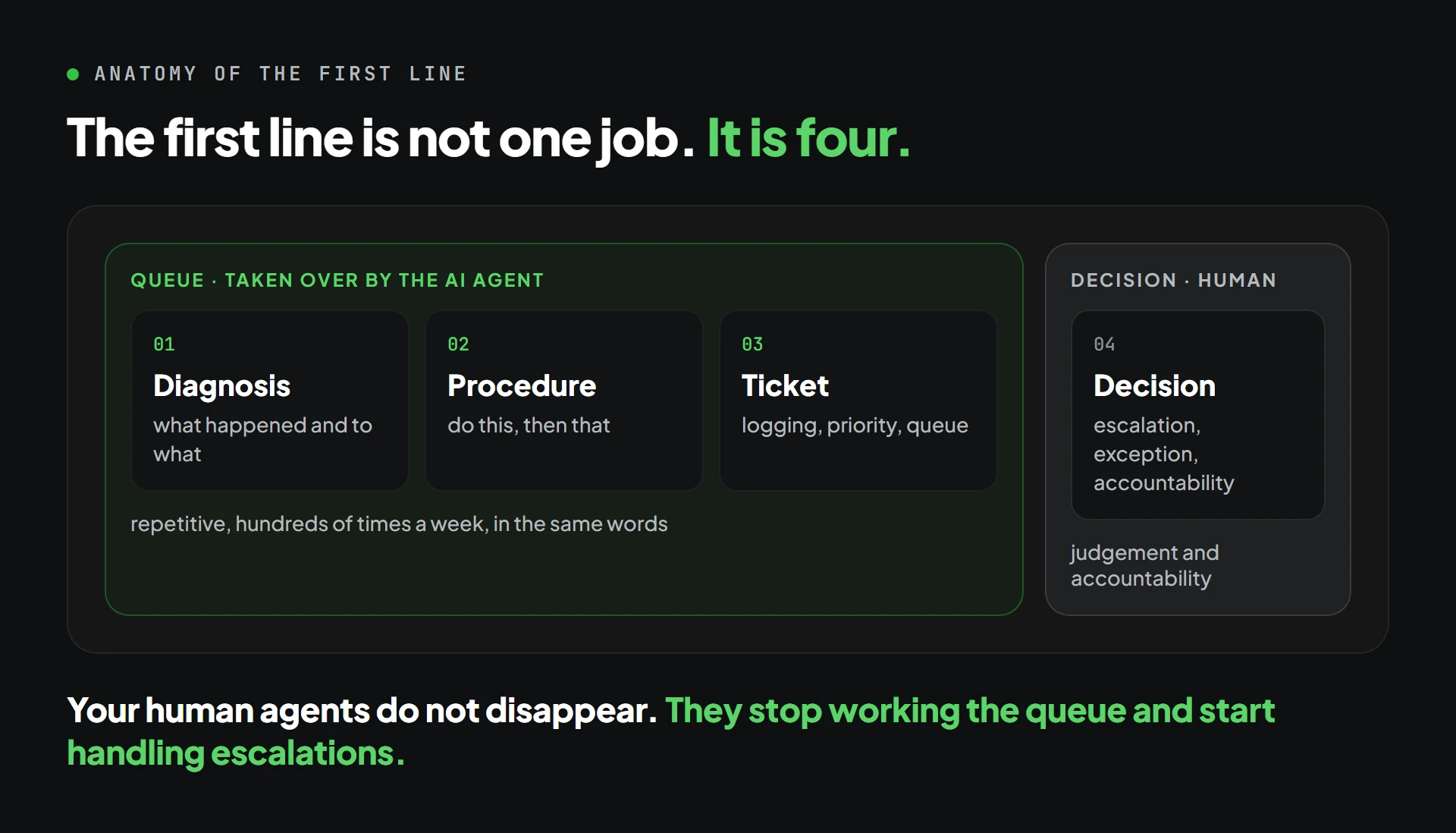
When you take the first three tasks off the line, your human agents do not disappear. They start to pick up. Escalation stops being a lottery in which an urgent case waits in the same queue as a password question. At the Dealz store chain, which we talked about at Retail Challenge, 22% of contacts now reach human agents and X-TALK handles the rest. The details are in the Dealz case study.
Why does an AI agent work well on the first line?
Because the first line requires qualities that are hard to find in people and that an agent has by definition.
It always answers. On Saturday at 2 pm, when a store till stops working, and at 11 pm, when a night-shift employee cannot log in. There is no waiting queue, because the agent handles many conversations at once. Outside your team's working hours it takes and logs the case, and routes urgent ones according to the on-call rules.
It knows who is calling. The conversation does not start with "which store are you calling from?". The phone number or the account logged into the app identifies the site, its equipment and its ticket history. That is zero seconds spent on context, which on a regular phone line can take a minute.
It speaks every language, in every channel. Phone, website chat, mobile app, Microsoft Teams for office staff. The same agent, the same knowledge, the same procedure. An employee speaks Ukrainian or English while the knowledge base is in Polish. The agent searches the Polish base and answers in the employee's language, so you do not maintain several versions of your procedures. There is more on this in our article on multilingual voicebots.
It goes through the procedure together with the user. A procedure written for someone reading it is not the same as a procedure in a conversation. "Restart the terminal" is one sentence in a PDF. In a conversation it means: say where the button is, wait, ask what the screen shows and choose the next path depending on the answer. The agent keeps the steps in order, and in the app it also shows them on screen with a diagram of the device, because an employee cannot hold a phone to their ear while taking a till apart.
It hears the person, not the room. There is no silence in a store, warehouse or production hall. Music, scanners, customers talking. Noise protection in X-TALK measures the background continuously and lets through to the agent only speech directed at the microphone. We describe the details in our article on interruptions and background noise.
What happens when the agent does not know the answer?
This is the most important question in the whole project. A model placed in a situation where it has to answer but has no basis for it will always say something. So the question is not "does AI hallucinate?" but "what does your system do when it has no answer?".
In a well-designed agent, the answer has two layers:
- The agent answers only from the procedure it has found. It does not make up a phone number, a price or a date.
- If it has found nothing that fits well enough, it does not guess. It switches to ticket intake. In our deployments we call this "procedure zero": a few questions about how urgent the case is, collecting the details the second line needs and logging a ticket in the system. For critical cases, it connects to a human agent straight away.
An example: an employee says "the back-room door won't close". There is no such procedure in the base. The closest thing the search finds is "the till drawer won't close", because the words are similar, but the case is completely different. The match is below the threshold, so the agent does not pretend to know. It asks whether the store can operate normally, collects a description and logs a ticket.
Procedure zero does not use search, because a safeguard cannot rely on the mechanism that has just failed. A threshold in code decides when it runs. The threshold has to be set on real conversations: too high and almost everything ends up as a ticket; too low and the agent starts guessing.
The second lesson from our deployments: AI does not fix bad procedures, it exposes them. If the introduction to a procedure says "do not ask about what you already know" and the steps contain an unconditional "ask about the message on the screen", the model will follow the instruction in the steps. A person would ignore it and nobody would ever find out. The agent will show it in the first week. Sometimes the fix is a single word, for example changing "ask" to "establish", that is, first check whether the answer has already been given.
When and how does a case reach a human agent?
Handover to a human happens in every system, including one where nobody designed it. The difference is that it then happens at a random moment: in the middle of a procedure, without a ticket, after twenty minutes of conversation. Designing the handover is not about making it rarer, but about making it happen in the right place and with full context.
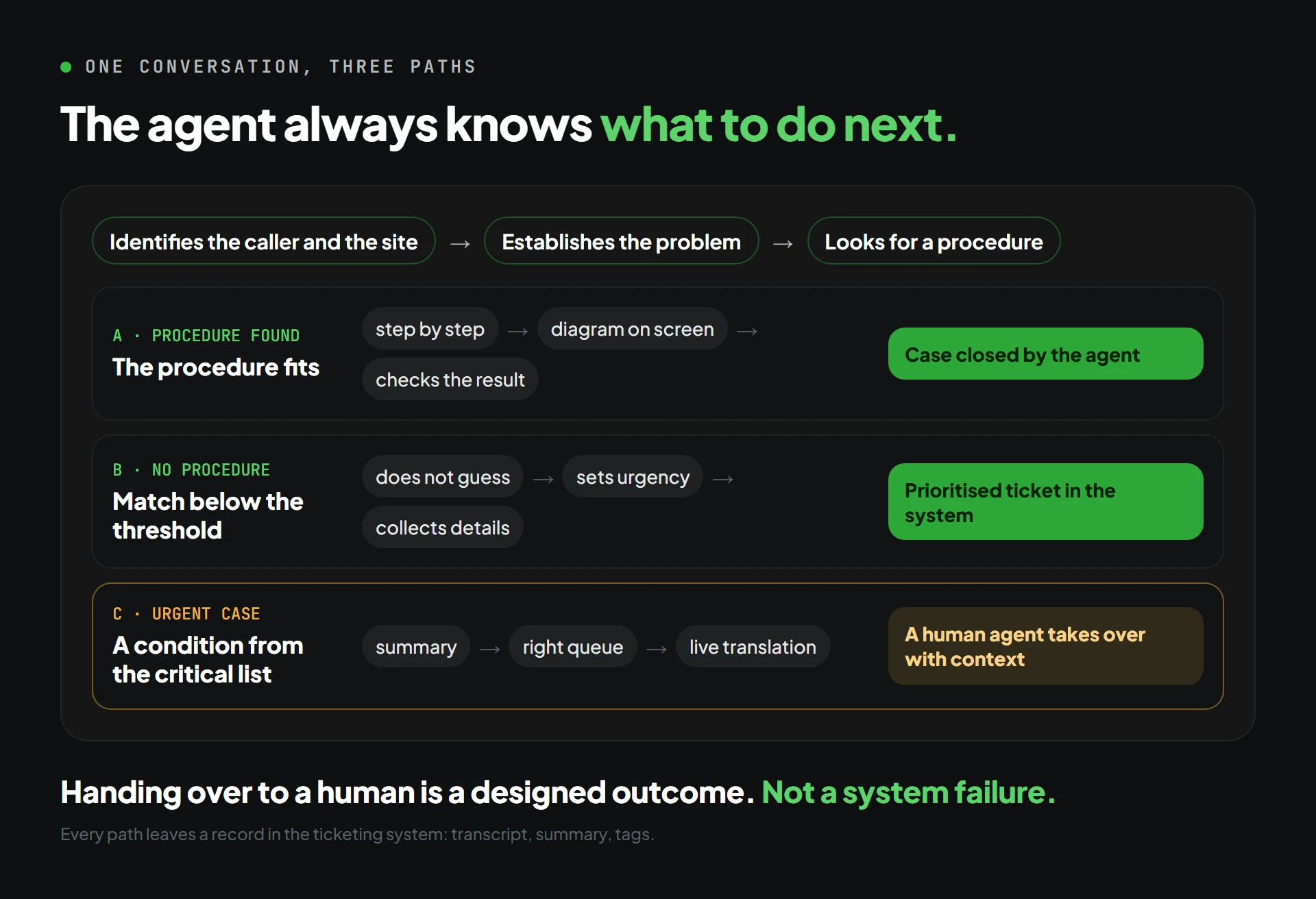
Three things make a good handover:
| What you design | How |
|---|---|
| When | a narrow, named list of conditions: sales blocked, safety, a case outside the procedures, an explicit request for a human. A general definition of a "critical case" makes handover the default state. |
| At which moment | once started, a procedure runs to a defined point. A handover does not interrupt step three of five. |
| With what | with a summary: what broke, which procedure and up to which step, what the user checked, the ticket number. The human agent does not ask the same thing twice. |
The case goes to the right skills-based queue rather than a single shared one: hardware, systems, head-office departments. The human agent takes it over in the agent console with the transcript and the details collected by the AI agent.
And what if the caller speaks a different language from the human agent? X-TALK translates the conversation live in both directions, also after handover to a human, in voice and in chat. The employee speaks Ukrainian, the human agent hears Polish and replies in Polish, and the employee hears Ukrainian. In the panel, the human agent sees the original and the translation. This removes the limitation of multilingual bots that worked perfectly until the moment a person who spoke the caller's language was needed.
It is also worth turning the metric around. Do not measure how rarely the agent hands cases over, but how many handovers happened before the end of a procedure and how many cases marked as critical really were. The first number keeps the agent from escaping to a human too early, the second keeps it from escaping too rarely after your fixes. An agent that never hands over is not better. It is simply guessing.
What do you gain beyond relieving the first line?
A complete picture of what happens in your contact with users. A regular phone line leaves a note saying "called, restart, ticket". An AI agent leaves much more:
- A transcript of every conversation, split between the agent, the user and the human agent, ready right after the call and searchable by word.
- A summary and tags assigned automatically, from a list tailored to your types of cases.
- Tickets that are always described the same way: site, device, symptom, steps taken, photos, priority. They reach the ticketing system during the conversation, for example ManageEngine ServiceDesk Plus, Freshdesk or Zendesk, rather than after it from notes.
- Hotspots: points where the agent had no answer or conversations ended in a handover. They are both a list of gaps in the knowledge base and an automation backlog.
- A map of what really breaks: after a few months you can see which devices, sites and procedures generate the most contacts, not just what people report.
We describe what the panel shows on the Analytics page and in the playbook chapter Post-call analysis: summaries, tags and hotspots.
How does the mobile app take pressure off the helpdesk?
A large share of helpdesk calls are not new cases but questions about old ones: "what's happening with my ticket?", "is the technician coming?", "has it been fixed yet?". The second large group is global outages, when everyone calls at once with the same question. The X-TALK mobile app answers both.
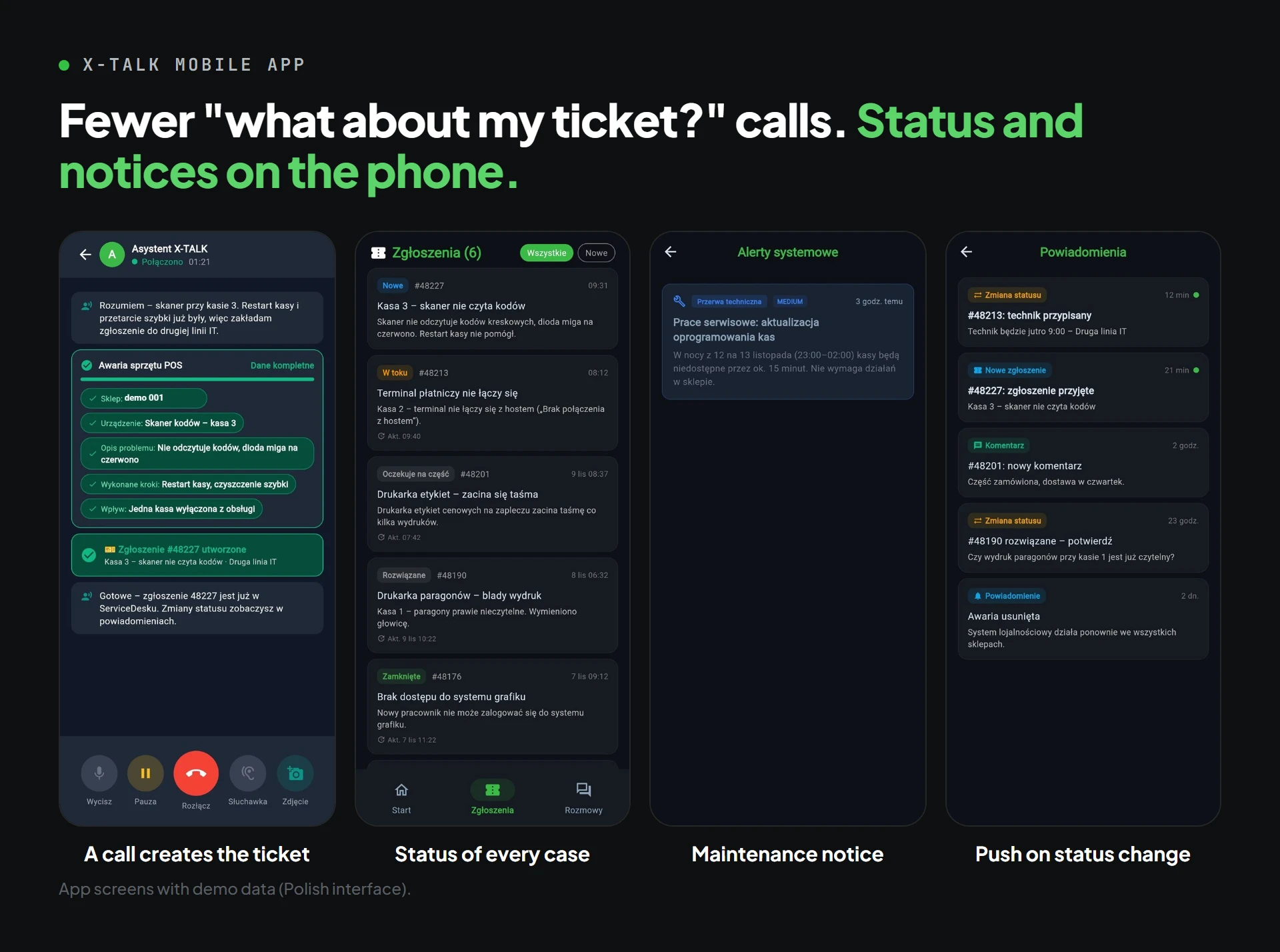
- The status of every case in one place. The site's tickets with their current status from the ticketing system, the technician's comments and the next step. Nobody needs to call to find out.
- Coming back to a case without telling the story again. A conversation interrupted by a customer at the till can be finished later, and the next shift opens the same ticket. The agent remembers which step of the procedure you stopped at. The call, the app and the ticket are one thread, not three separate events.
- A choice of how to get in touch. Users talk by voice, write in chat or attach a photo to the ticket with one tap, in their own language.
- A push notification instead of an avalanche of calls. During a global outage or planned maintenance, head office sends a message to all sites: a push in the app and, if needed, an SMS or a phone call. Users know the problem is known and when it will be fixed, so they do not call. It is worth adding the same message to the agent's knowledge: then, for anyone who calls anyway, it will confirm the outage straight away instead of logging a hundred identical tickets.
You will find more about the app on the Mobile app page, and about how a case becomes a continuous thread in our article How AI turns the service desk into a continuous thread.
Does this only work in IT?
No. Nothing in this mechanism knows that it works in IT. Only two things change: the knowledge base and the system the case goes to. Recognising the contact, guiding through the procedure, procedure zero, handover with context, the screen and returning to the thread all stay the same. Examples from our deployments and demo projects:
| Where | Knowledge base | System the case goes to |
|---|---|---|
| Store chain (Dealz), IT support | procedures for tills, payment terminals, printers, routers | ticketing system with skills-based queues |
| Franchise network, complaints | rules for taking complaints, list of sites | ticket with the site identified, by voice and email |
| Medical clinics | test preparation, scope of services | booking system: book, cancel, remind |
| Ski school (SnowUp) | offer, lesson rules | booking system: the call ends with a booked lesson |
| Office staff in Microsoft Teams | policies, IT and HR instructions | ticket to the right department |
| Online store after-sales | returns and complaints rules | order status, service request |
The first line of support for a store chain such as Dealz is in fact a tougher testing ground than a customer phone line. The caller is in a noisy place, has their hands full, speaks shop-floor language, and dozens of procedures describe the same five devices. If it works on the shop floor on a Saturday at 2 pm, it will work on your line too.
What will AI on the first line not change?
To be honest, three things:
- Decisions stay human. Exceptions, escalations and accountability stay with your team, on purpose.
- A bad procedure remains a bad procedure. The agent will follow it exactly, so it will quickly show where it is contradictory or unclear.
- It does not work without a system on the other side. A conversation that leaves no record in the ticketing system is a lost conversation, even if it went perfectly.
The first weeks after launch are about learning from recordings. The hardest things, from noise to contradictory instructions, come out of real conversations, not workshops. That is why it is worth closing every fix with a test scenario: agent tests run the same conversations after every change and show whether the agent has slipped back into an old mistake.
Pre-launch checklist:
- Procedures written separately for each problem, with symptoms described in the caller's own words.
- The three most-used procedures reviewed: no sentence in the steps contradicts the rules in the introduction.
- A ticketing system the agent can write the case to during the conversation.
- A named list of conditions for immediate handover to a human agent.
- Skills-based queues and an owner of the escalation path who decides what counts as an exception.
- Agreed human-agent languages and rules for translation after handover.
- A plan for global-outage messages: who sends the push and who adds the message to the agent's knowledge.
- Team agreement that the first weeks are about fixes based on recordings.
We describe how to design handover and queues in the playbook chapter Routing, queues and handover to a human, and how to prepare procedures for the agent in the chapter How to prepare a knowledge base. We show the solution for chains and companies with branches on the Service desk page.
Frequently asked questions
Will an AI agent replace first-line human agents?
It will not replace them, it will change their work. The agent takes over the repetitive part: diagnosis, procedures and logging tickets. Human agents handle the cases that need a decision and pick up escalations without waiting in the same queue as simple questions.
What if the agent does not understand the problem?
It asks follow-up questions, and if it still cannot find a matching procedure, it does not guess. It switches to ticket intake: it establishes urgency, collects a description and details and logs a ticket, and for a critical case it connects to a human agent straight away.
How does the agent decide that a case is urgent?
From a named list of conditions that you agree with your team: for example, sales blocked, a safety risk, a case outside the procedures or an explicit request for a human. The narrower and more specific the list, the less often the agent hands cases over unnecessarily.
Does the human agent need to speak the caller's language?
No. X-TALK translates the conversation live in both directions, also after handover to a human agent, in voice and in chat. In the panel, the human agent sees the original and the translation, as well as a case summary in their own language.
Which ticketing systems does it work with?
The agent creates and updates tickets during the conversation, including in ManageEngine ServiceDesk Plus, Freshdesk and Zendesk. You connect other systems through their API, also using custom tools built with Copilot.
How can you reduce the number of calls during a global outage?
By sending a message to all users: a push notification in the mobile app and, if needed, an SMS or a phone call. If you add the same message to the agent's knowledge, it will confirm the outage to callers straight away and give the expected fix time, instead of logging dozens of identical tickets.